

Check your outdoor space
Open live video in the Girafit app on your iOS or Android phone. Internet access at the camera and on your phone enables remote viewing.

CLEARVERO WINDOW SECURITY
$188.00 USD
See your driveway, porch or yard from a camera mounted inside your window. Check 2K video, receive person and motion alerts, and choose the local recording package that fits your home.
AT A GLANCE
Keep your camera indoors while watching the outdoor space that matters to you. An adhesive window mount, wired power and dual-band Wi-Fi make it a practical choice for homes and apartments.
A detailed view of your porch, driveway or yard.
Connect to your 2.4 GHz or 5 GHz home network.
Choose detection zones and notification settings in the app.
Choose Camera Only, or a package with a 64GB, 128GB or 256GB microSD card.
Mount on the inside of a clean window using the included adhesive mount.
Color night viewing uses available outdoor light, such as a porch or street light.
The ClearVero™ 2K Window Wi-Fi Security Camera brings 3MP 2K viewing to your porch, driveway or yard. Mount the camera on the inside of clean window glass with the included adhesive mount, connect the supplied power adapter and USB cable, and view your outdoor space in the Girafit app for iOS or Android.
Connect to 2.4 GHz or 5 GHz Wi-Fi, with Bluetooth assisting initial setup. Personalize person and motion notifications, sensitivity and detection zones. Color night viewing uses available outdoor light, such as porch or street lighting.
The camera supports Class 10 microSD cards from 16GB to 256GB. Format the card in the app, then choose continuous or event recording. Loop recording replaces older footage as storage fills. Local recording works without a cloud subscription; optional cloud event storage is purchased separately in the app.
Use the camera indoors, within reach of power and Wi-Fi. Preview the view before mounting and keep curtains clear. The microphone and speaker operate on the indoor side of the glass; use video and activity alerts for the outdoor view. Internet access at the camera and on your phone enables remote viewing.
Includes ClearVero Product Specialist support, a 1-Year ClearVero Product Warranty and a 30-Day Money-Back Guarantee. Eligible U.S. orders include free standard shipping. Processing normally takes 1–3 business days, followed by estimated delivery within 7 business days. Email info@clearvero.com for product assistance or return authorization within 30 calendar days of delivery. ClearVero covers approved return shipping for verified defects, shipping damage or fulfillment errors; change-of-mind return shipping is customer-paid.
A WINDOW ON YOUR HOME
Check live video, receive useful activity alerts and revisit recorded moments from the Girafit app.
Open live video in the Girafit app on your iOS or Android phone. Internet access at the camera and on your phone enables remote viewing.
Enable person detection and adjust motion sensitivity or a detection zone to suit the view from your window.
Record continuously or when an event occurs on your microSD card. Loop recording replaces the oldest footage as storage fills; save the clips you want to keep.
EVERYDAY WINDOW VIEWS
Position the camera indoors with a clear view through the glass. Preview the framing in the app before fixing the mount in place.

PORCH & ENTRY
Place the camera at an indoor window beside your entrance to check arrivals and deliveries. Frame your porch and front path in the app before fixing the mount.
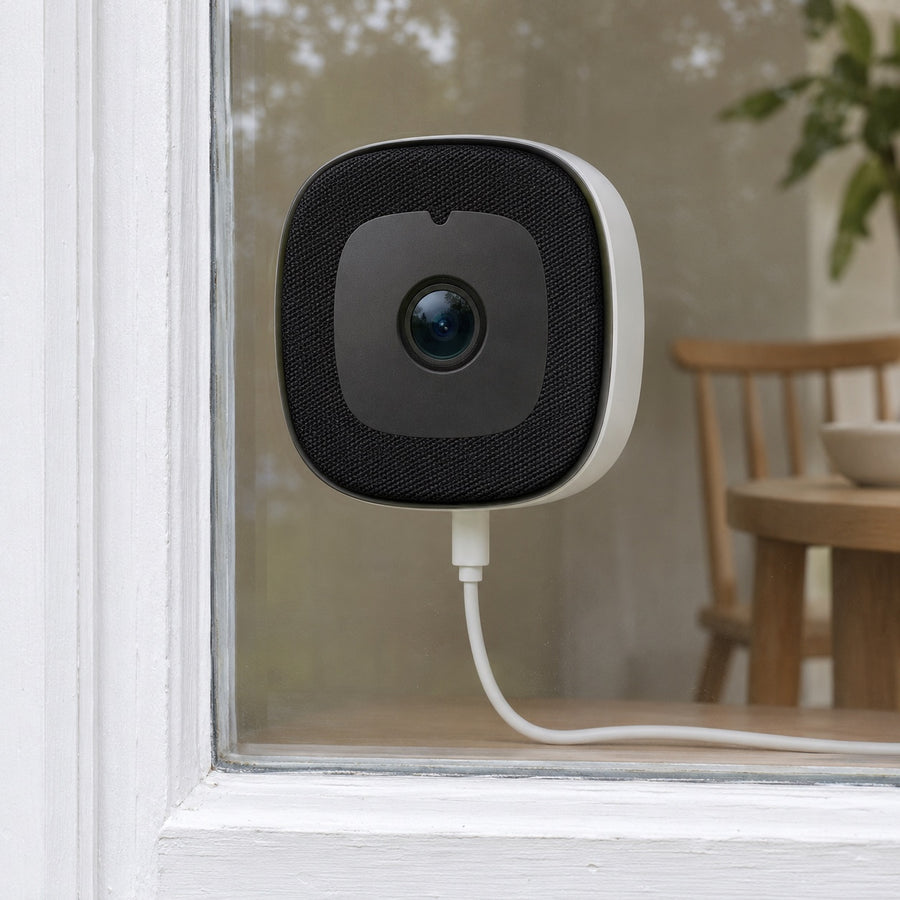
Camera mounted indoors; lens viewed from the porch through the glass.

DRIVEWAY
Use a window facing your private driveway to check your parked vehicle and arrivals. Keep the view clear of curtains and focus your detection zone on your property.
Example placement facing your own driveway.

YARD & GARDEN
Stay connected to your private garden or patio from a kitchen or rear window. Keep plants and window coverings clear of the lens, then check your framing in the app.
Example placement facing your private garden.
POWER, WI-FI AND RECORDING
Power the camera with the supplied adapter and cable, connect it to Wi-Fi and open the Girafit app. Add local storage with the package you choose.
View your selected outdoor area in 3MP 2K video from an indoor window.
Choose person detection, motion sensitivity and a detection zone in the Girafit app.
Save a continuous timeline or event recordings to your microSD card. Format the card in the app during setup.
Color night viewing uses available outdoor light. A well-lit porch or driveway provides a suitable night-time view.
SIMPLE WINDOW SETUP
Choose your window, connect the camera and personalize recording in the app.
Choose a clear view of your property. Clean and dry the glass, and check that the cable reaches a suitable indoor power outlet.
With the camera unplugged, insert your microSD card if you plan to record locally.
Connect the included adapter and cable. Enable Bluetooth on your phone for setup, then follow the Girafit app to connect to your 2.4 GHz or 5 GHz Wi-Fi.
Preview the view, apply the adhesive mount and attach the camera upright. Format your card in the app, select recording and alert settings, then review a saved clip.
A GOOD FIT
Use the camera indoors on window glass, within reach of a power outlet and your Wi-Fi network.
Mount the camera on the inside of the glass with the lens facing outward. Keep curtains and furniture clear of the view.
The camera uses the supplied wired power connection and a 2.4 GHz or 5 GHz Wi-Fi network. Bluetooth assists the initial setup.
Use a Class 10 microSD card from 16GB to 256GB. Card-included packages provide the selected capacity; Camera Only lets you use your own compatible card.
WINDOW PLACEMENT
Check the camera view in the app at your chosen window, in daylight and with your usual outdoor lighting.
Clean and dry the mounting area. Choose a view clear of curtains, window coverings and objects close to the glass.
Route the included cable neatly to an indoor outlet. Leave enough slack for a secure connection and normal window use.
Point the camera toward your own property, set a useful detection zone and review a saved clip after setup.
SEE THE INSTALLATION
The lens faces through the glass toward the area you want to monitor. The camera and its power cable remain inside your home.
Clean and dry the glass, preview the view in the app, then apply the included adhesive mount with the camera upright. Route the cable to a nearby indoor outlet without trapping it in the window.

EVENING WINDOW VIEW
Color night viewing uses available outdoor light. A porch light or street light helps illuminate the area you want to monitor.
Check your live view after dark with your usual outdoor lighting. Reduce nearby indoor reflections and adjust the framing in the Girafit app.
TECHNICAL SPECIFICATIONS
3MP 2K video, dual-band Wi-Fi and local recording from an indoor window installation.
THIS CAMERA OFFER
Every package includes one window camera, one power adapter, one USB power cable, one adhesive mounting sticker and a user manual. Card packages also include one microSD card of the selected capacity.
One white indoor window camera with its adhesive mounting sticker and user manual.
One power adapter and one USB power cable for continuous wired power.
COMPLETE YOUR SETUP
Use your indoor power outlet and Wi-Fi network with an iOS or Android phone. Local recording uses a compatible microSD card.
Use a 2.4 GHz or 5 GHz Wi-Fi network and the Girafit app on your iOS or Android phone.
The 64GB, 128GB and 256GB packages include one matching microSD card. Camera Only: microSD card sold separately.
BUYER FAQ
Quick answers about your window camera, recording packages and purchase.
Mount it on the inside of a window, with the lens facing outward through clear glass.
Use the included adhesive mounting sticker on clean, dry glass. Preview the view in the app before mounting.
Connect the supplied USB cable and 5V power adapter to a nearby indoor outlet. Keep it connected during use.
The camera connects to 2.4 GHz or 5 GHz Wi-Fi. Enable Bluetooth on your phone for the initial setup.
Use the Girafit app for iOS or Android. Internet access at the camera and on your phone enables remote viewing.
The camera uses available ambient light, such as porch or street lighting. Choose a window with a suitably lit outdoor view.
The 64GB, 128GB and 256GB packages each include one card of the selected capacity. Camera Only: microSD card sold separately.
Yes. Insert and format a compatible microSD card in the app, then choose all-day or event recording.
Loop recording replaces the oldest footage. Save important clips before they are overwritten.
Local microSD recording works without a cloud subscription. Optional cloud event storage is purchased separately in the app.
The microphone and speaker operate on the indoor side of the glass. Use video, person alerts and motion recording to monitor the outdoor view.
Your camera includes a 1-Year ClearVero™ Product Warranty for eligible defects under normal use. Email info@clearvero.com with your order number for assistance.
Email info@clearvero.com within 30 calendar days of delivery for return authorization. Keep the complete product and packaging for an eligible change-of-mind return.
ClearVero™ covers approved return shipping for verified defects, shipping damage or fulfillment errors. Change-of-mind return shipping is customer-paid.
Eligible U.S. orders include free standard shipping. Processing normally takes 1–3 business days, followed by estimated delivery within 7 business days.
CAMERA AND STORAGE OPTIONS
Every package includes the same window camera and power and mounting kit. Choose Camera Only, or add one microSD card in the capacity you prefer.
One camera with power and mounting kit. microSD card sold separately.
$68.00 USD
Select packageOne camera with power and mounting kit, plus one 64GB microSD Card.
$108.00 USD
Select packageOne camera with power and mounting kit, plus one 128GB microSD Card.
$148.00 USD
Select packageOne camera with power and mounting kit, plus one 256GB microSD Card.
$188.00 USD
Select packageYOUR WINDOW. YOUR POINT OF VIEW.
Choose your ClearVero™ window camera package for 2K viewing, person and motion alerts, and the local recording capacity you prefer.
Selected SKU CV-W150-256
Your selected package and quantity are ready to add.