Record up to 16 compatible IP cameras in one place. Built-in PoE powers your cameras over Ethernet, and two SATA bays let you choose your recording capacity.
✓One ZNR-222P recorder · 16 included channel licenses
✓16 built-in PoE ports · Two SATA bays for drives sold separately
Bring wired cameras together at your business or property. The ZNR-222P includes 16 channel licenses, built-in camera power and local playback.
Connect up to 16 cameras
Sixteen recording channels and sixteen licenses are included. Cameras are purchased separately.
Power cameras over Ethernet
Sixteen 10/100 Mbps PoE ports provide up to 30 W per port within a shared 240 W total budget.
Choose your own storage
Choose up to two 3.5-inch SATA drives, up to 24 TB each. Drives are sold separately.
Record detailed video
Accept camera streams up to 12 MP, with H.265 or H.264 compression and up to 160 Mbps total recording throughput.
Review locally
Connect a display through HDMI up to 4K at 30 Hz or VGA up to 1080p. A USB mouse is included.
Search supported events
Find recorded events with supported camera analytics and use Smart Search with compatible Smart Motion Detection cameras.
What’s included and what’s sold separately
Build a 16-channel wired recording system
Bring up to 16 compatible IP cameras together at your business or property. The ACTi ZNR-222P includes 16 channel licenses and 16 PoE ports for power and video over Ethernet.
Included with your recorder
One ZNR-222P recorder, all 16 channel licenses and a USB mouse. Choose recording drives for the capacity your site needs.
Optional add-ons — sold separately
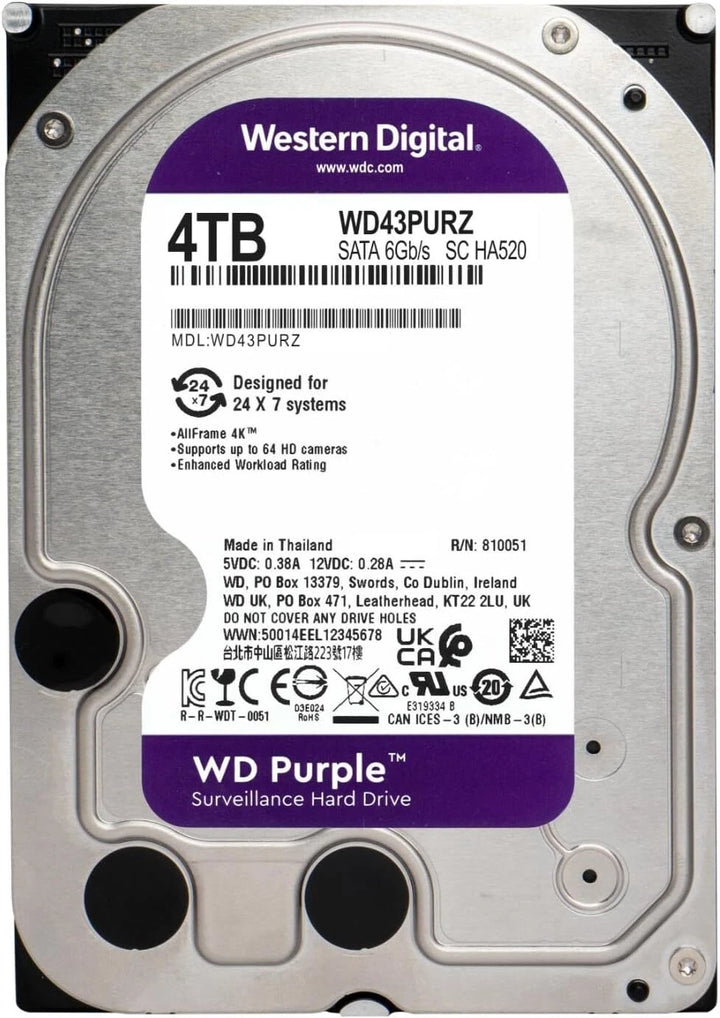
WD Purple WD43PURZ 4 TB surveillance hard drive — sold separately. Add local recording storage in one of the two SATA bays.
ACTi Z331 4 MP ColorGuard outdoor PoE bullet camera — sold separately. Cover exterior entrances and approaches.
ACTi Z912 5 MP LightGuard outdoor PoE mini dome camera — sold separately. Cover entrances with a compact dome.
Other cameras and drives, a monitor, Ethernet cables and optional rack brackets are sold separately.
Plan power, recording and storage
The built-in PoE ports provide up to 30 W per port and 240 W combined. Sixteen cameras at 12 W each use 192 W. Record up to 160 Mbps total. Sixteen streams at 8 Mbps each use 128 Mbps. Use the separate Gigabit uplink to connect the recorder to your network.
Install up to two compatible 3.5-inch SATA drives, up to 24 TB each. At 32 Mbps combined, a 4 TB drive holds about 11.6 days of continuous recording before formatting and overhead. Export important clips for a separate backup. RAID is not supported.
View footage and find events
Record compatible H.264 or H.265 streams up to 12 MP. With Smart IVA off, view up to two 12 MP streams or 16 streams at 720p, at up to 30 fps. Use Smart Intrusion on up to two recorder channels and Smart Search with compatible Smart Motion Detection cameras.
Get setup and after-sales help from ClearVero
Email info@clearvero.com for help matching cameras, power and storage. ClearVero handles your 2-Year ClearVero™ Product Warranty and eligible returns under our 30-Day Money-Back Guarantee.
WHY THIS RECORDER
One recorder for the views that matter
Bring entrances, work areas and outdoor approaches together in one recording system. Choose the camera views and recording schedule that fit your property.
01
Power cameras and carry video on one cable
Use one Ethernet cable for power and video to each compatible camera. Sixteen cameras drawing 12 W each would use 192 W of the shared 240 W budget. Use each camera’s peak draw, including night lighting, and stay within 30 W per port.
02
Choose a drive for the hours you record
For eight cameras at 4 Mbps each, a 4 TB drive holds about 11.6 days of continuous footage before formatting and overhead. Use your actual combined bitrate and recording schedule to choose capacity. The drive is sold separately.
03
Find recorded events faster
Use Forensic Search to find similar people or vehicles across recorded channels. Smart Search works with compatible cameras that support Smart Motion Detection.
WHERE IT FITS
Plan around the site you need to watch
Cover a shop, office or wired property with the same recorder and a camera layout tailored to the site.
SMALL BUSINESS
Shop entrances and service areas
Review the entrance, checkout and stockroom from one recorder, with local playback for the clips you need.
WIRED PROPERTY
A wired home or multi-zone property
Record compatible cameras covering separate zones to local drives. Place the recorder in a dry, ventilated indoor location and secure access to footage.
SYSTEM REFRESH
An existing IP camera installation
Bring compatible ONVIF IP cameras into one local system. ClearVero can check your camera models for the video, audio and events you plan to use.
POWER, NETWORK AND STORAGE
Plan camera power, video traffic and local storage
Connect compatible cameras to the built-in PoE ports and connect the separate Gigabit uplink to your network. Use HDMI or VGA for local viewing, then verify playback from the installed drive.
IPYour IP camerasUp to 16 compatible cameras. Check each camera’s power and video settings.
→
PoEBuilt-in camera power16 PoE ports; up to 30 W per port and 240 W shared across all ports.
→
NVRRecord to installed drivesZNR-222P with two empty 3.5-inch SATA bays. Choose drives separately.
→
VIEWLocal displayUse HDMI or VGA for a separately purchased monitor and the included USB mouse.
Record up to 12 MP and choose your viewing layout
Record compatible streams up to 12 MP. With Smart IVA off, view up to two 12 MP streams or a 16-camera grid at 720p per stream, at up to 30 fps.
ONVIF
Camera interoperability
ONVIF Profiles S, G and T support compatible IP cameras. ClearVero can check the video, audio and events you need by camera model and firmware.
EVENT
Set up event recording and search
Enable recorder-side Smart Intrusion on up to two channels. Use compatible camera events for the views where you want additional alerts or search options.
I/O
Audio and alarm connections
One RCA input and one RCA output support two-way audio with suitable external equipment. Eight digital inputs, two digital outputs and one RS-485 connection support compatible site integration.
SETUP
A recorder for an indoor equipment area
Allow room for airflow, plugs and cable bends. Use 100–240 V AC power and protect the equipment from moisture. Keep access credentials and firmware managed.
INSTALLATION GUIDANCE
Plan your installation in four steps
ClearVero can help you match your camera models, PoE requirements and recording schedule to the recorder before you order.
1ClearVero setup guidance
List cameras and power needs
Add the peak power of the cameras you plan to connect. Keep each port within 30 W and all ports within 240 W. Add the bitrates of the streams you will record and keep the total within 160 Mbps.
2Storage planning
Choose drives and a recording schedule
Plan bitrate, recording hours and retention before selecting storage. Install compatible drives and confirm that the recorder recognizes them.
3Installation planning
Place and connect the recorder
Provide a dry, ventilated indoor position, AC power, Ethernet routes and display connections. Rack brackets are optional and require a compatible rack and adequate clearance.
4Commissioning
Test recording and review
Set the clock, then test live view, a saved clip and an export. Verify the audio and events you need before you connect the rest of the cameras.
CHOOSE WITH CONFIDENCE
Build around your site
Choose the camera views, storage and local display layout that suit your installation.
✓
Up to 16 wired IP cameras
Connect up to 16 compatible wired IP cameras with up to 160 Mbps of recording throughput and 240 W of shared PoE power.
✓
Storage you choose yourself
Start with the capacity you need and use the second SATA bay to expand recording storage.
✓
Review footage on a local display
Choose a 16-camera grid for a site overview or a two-stream 12 MP layout for more detail with Smart IVA off. Export important clips for safekeeping.
INSTALLATION DIMENSIONS
Leave room for the recorder and its connections
The enclosure measures 380 mm wide × 53 mm high × 322 mm deep (about 15.0 × 2.1 × 12.7 inches). Allow extra space for cable bends, connectors and ventilation. Check rack clearance rather than assuming every 1U opening will fit.
Simplified enclosure diagram for planning; not to scale. Rack brackets and installation clearances are additional.
TECHNICAL SPECIFICATIONS
ZNR-222P specifications in one place
Use these specifications to match camera power, recording capacity, storage and connections to your site.
Recording and licenses
IP channels
Up to 16
Included licenses
16 included
Camera resolution
Up to 12 MP
Video compression
H.265 / H.264
Recording throughput
Up to 160 Mbps total
Outgoing throughput
Up to 128 Mbps
Camera power and network
PoE camera ports
16 × 10/100 Mbps Ethernet
PoE output
Up to 30 W per port, within a shared 240 W total budget
Network uplink
1 × 10/100/1000 Mbps Ethernet
Interoperability
ONVIF Profiles S, G and T; exact functions depend on camera and firmware
Platform
Standalone ARM SoC / Linux
Camera count in this offer
Sold separately
Storage and local viewing
Drive bays
2 × 3.5-inch SATA; drives sold separately
Maximum drive capacity
24 TB per bay; 48 TB raw total
RAID
Not supported
Display outputs
HDMI up to 4K at 30 Hz; VGA up to 1080p
Synchronous playback
Up to 16 channels; decoding limits still apply
USB
1 × USB 2.0 and 1 × USB 3.0
Decoding and events
Smart IVA off
Up to 2 × 12 MP / 2 × 4K / 4 × 4 MP / 10 × 3 MP / 16 × 720p at 30 fps
Smart IVA on
Up to 2 × 4K / 4 × 4 MP / 8 × 1080p / 16 × 720p at 30 fps
Recorder-side Smart Intrusion
2 channels
Smart Search
Requires an SMD-capable camera
Camera analytics
Supported incoming functions depend on exact camera and firmware
Practical limit
Recording, playback and simultaneous display are separate capacities
−10 to 60°C; 10–90% relative humidity, non-condensing
Listings
UL Listed; BSMI
INCLUDED IN THIS OFFER
Your diskless recorder configuration
The ZNR-222P recorder, USB mouse and all 16 channel licenses are included.
Included1
ZNR-222P recorder
One diskless recorder with 16 included channel licenses.
Included1
USB mouse
Use the included USB mouse for local recorder controls.
COMPLETE YOUR SETUP
Choose the surrounding equipment
Storage, cameras, display, cables and rack brackets are separate purchases. Reuse compatible equipment you already own when it meets the requirements above.
OptionalSeparate
Hard drives
Choose compatible 3.5-inch SATA drives for recording. Up to two bays are available.
Sold separately.
OptionalSeparate
Cameras, display and cables
Choose compatible cameras, a display and connection cables for your site.
Sold separately.
BUYER FAQ
Frequently asked questions
What’s in the box?
One ZNR-222P recorder, 16 channel licenses and a USB mouse. Drives, cameras, display, Ethernet cables and optional rack brackets are sold separately.
How many cameras can I record?
Up to 16 compatible IP cameras at up to 12 MP per stream and 160 Mbps combined.
What storage can I install?
Up to two compatible 3.5-inch SATA drives, up to 24 TB each. Drives are sold separately.
How much footage fits on a 4 TB drive?
About 11.6 days of continuous recording at 32 Mbps combined, before formatting and overhead.
Which IP cameras can I use?
Use compatible ONVIF IP cameras with H.264 or H.265 video. ClearVero can check audio and events for your camera models.
What can I see on a local monitor?
View up to 16 streams at 720p or two at 12 MP, at up to 30 fps with Smart IVA off.
Which smart features can I use?
Smart Intrusion works on up to two recorder channels. Smart Search works with compatible Smart Motion Detection cameras.
Can I power cameras directly from the recorder?
Yes. Use the 16 built-in PoE ports for up to 30 W per camera and 240 W combined.
How do I mount it in a rack?
Use a compatible shelf or optional rack brackets, sold separately. Allow space for ventilation and cables.
When will my order ship?
In-stock U.S. orders typically ship the same or next business day after payment confirmation. UPS Ground typically takes 2–7 business days.
Who handles my warranty?
ClearVero manages your 2-Year ClearVero™ Product Warranty from delivery. Email info@clearvero.com with your order and serial numbers.
How do I request a return?
Email info@clearvero.com within 30 calendar days of delivery. Keep the recorder complete and resalable, with its original packaging.
Can ClearVero help me choose my setup?
Yes. Email info@clearvero.com with your camera models and recording goals for help choosing power and storage.
OPTIONAL STORAGE ADD-ON
Add storage for continuous recording
Choose the WD Purple 4 TB surveillance drive for local recording. Sold separately.
Useful when: You need local recording storage and do not already have a suitable drive.
Not needed when: You already have a suitable 3.5-inch SATA surveillance drive.
Compatibility: Fits the ZNR-222P 3.5-inch SATA storage specification. One drive occupies one of its two bays. Sold separately; installation required. Recording time depends on camera settings and bitrate.
Sold separately. Installation is required; the recorder ships without a drive installed. One drive is suggested per recorder. The ZNR-222P has two drive bays.
Optional — sold separately
OPTIONAL CAMERA ADD-ONS
Compatible ACTi PoE cameras
Choose a 4 MP bullet for outdoor approaches or a 5 MP mini dome for entrances. Both are compatible for video recording and sold separately.
Select the cameras and quantities you need, then use Add to Cart below to add them with the recorder.
ACTi Z331 4MP ColorGuard Outdoor PoE Bullet Camera
A fixed 4 MP bullet for exterior entrances and approaches. Sold separately.