

Choose the framing before you mount
The fixed 2.8mm lens covers a 100.7° horizontal view. Choose the mounting position for the detail you need at your subject distance.

COLORGUARD BULLET
Cover a driveway or entrance with a wide fixed view. Use 5MP for more scene detail, or choose a lower supported resolution when a faster frame rate matters.
AT A GLANCE
Choose this fixed bullet when 100.7° of horizontal coverage fits your approach. Check the distance to your subject, then choose a frame rate, night lighting mode and recording setup.
5MP up to 2560 × 1920 at 20 fps or 2304 × 1296 at 30 fps.
Fixed 2.8mm F1.6 lens and built-in one-way microphone.
Run Ethernet to a compatible IEEE 802.3af PoE switch or injector, or use wired Ethernet with a suitable 12V DC supply.
Plan a compatible memory card, NFS destination, or ONVIF Profile S or T recorder or VMS. Recording equipment and storage are sold separately.
IP68 weather protection. Protect exposed cable connections.
Smart motion detection for people and vehicles and tamper detection.
The ACTi Z332 is a wired outdoor bullet camera for an entrance, driveway, or service approach. Its fixed 2.8mm lens gives you a wide view, and 5MP video adds detail when you need to review an event.
The camera starts in infrared mode for black-and-white video without visible lighting from the camera. Enable the built-in white light in the camera settings when color detail is useful and visible light is appropriate for the location. People and vehicle detection can help you focus alerts on the activity that matters.
Run Ethernet to a compatible IEEE 802.3af PoE switch or injector for power and data on one cable. You can also use a compatible 12V DC supply and a wired network connection. Power equipment and Ethernet cable are sold separately.
Record to a compatible memory card in the camera, an ONVIF Profile S or T recorder or VMS, or compatible NFS network storage. Confirm recording, playback, and event support on your recorder before ordering. A memory card, recorder, and other storage are sold separately.
One white Z332 camera with its integrated mounting bracket, a cable gland with rubber and washer, a mounting screw kit, a rubber plug, and the supplied printed product documentation.
ACTi PMAX-0729 Sold separately. Use the junction box when you need space to protect the cable connection at the mount.
ACTi PMAX-0538 Sold separately. For a compatible 2.64–5-inch vertical pole, pair this bracket with one PMAX-0729 per camera.
The lens is fixed at 2.8mm. Position the camera for the coverage you need during installation.
Color at night needs enough visible light. Keep infrared enabled when visible light would disturb the site, or configure the white LEDs for the scenes where color is useful.
Your camera includes a 2-Year ClearVero™ Product Warranty from delivery. Email info@clearvero.com with your order number and a description of the issue, and ClearVero will handle your claim.
Email info@clearvero.com within 30 calendar days of delivery for return authorization. For a change-of-mind return, keep the camera complete and resalable and use tracked return shipping at your expense.
Connect the separately powered camera and the DVR over Ethernet, then add the camera as an IP device. Use the recorder’s custom RTSP mode with an H.264 stream for live view and recording.
ACTi YVR-120 Sold separately. Use up to 2 IP cameras with 4 analog cameras, or up to 6 IP cameras in IP-only mode. Total recording bandwidth is 16 Mbps.
ACTi YVR-121 Sold separately. Use up to 4 IP cameras with 8 analog cameras, or up to 8 IP cameras in IP-only mode. Total recording bandwidth is 32 Mbps.
The DVR needs its own compatible SATA drive for local recording. For microphone audio, alerts or camera controls, use a recorder that supports those features separately.
WD Purple WD43PURZ 4TB. Sold separately. Install this SATA drive in either optional DVR for local recording.
PLANET PPOE-0107 PoE Injector Sold separately. Powers one camera and carries its data over the same Ethernet cable.
WHY THIS CAMERA
Use the 5MP setting to review more detail across a broad approach. If smoother motion matters, select a supported lower resolution. Check usable detail on the installed scene.
The fixed 2.8mm lens covers a 100.7° horizontal view. Choose the mounting position for the detail you need at your subject distance.
130 dB wide dynamic range helps with bright and shaded areas. Adaptive infrared is rated up to 50 m (about 164 ft) under suitable conditions. Infrared gives black-and-white video by default. Enable white light in the camera settings for color, with a separate 50 m illumination rating.
Person and vehicle motion detection, tamper detection, and sound-triggered events. A compatible recorder must support any events you want it to receive.
OUTDOOR APPLICATIONS
Start with the area you want to see and the equipment you already own.

ENTRANCES
Place the fixed bullet to cover a driveway or loading approach. Review a sample at the intended distance to check whether the 5MP stream shows the detail you need.
Installation concept illustration.

SERVICE AREAS
For a supported 2.64–5-inch vertical pole, use one PMAX-0538 pole mount and one PMAX-0729 junction box per camera. Both are sold separately. Protect the cable connections and check the mounting surface before drilling.
Installation concept illustration.

WIRED SYSTEMS
Use an available channel on a compatible recorder or VMS. Check Ethernet reach, the PoE budget, and how the recorder handles the selected streams and events.
Installation concept illustration.
POWER, NETWORK AND RECORDING
Run Ethernet to the camera, choose power, then confirm where video will be recorded and how you will review it.
Choose from H.265 and H.264. The camera supports simultaneous dual streams. Check which resolution, frame rate, and format your recorder can save.
Person and vehicle motion detection, tamper detection, and sound-triggered events. Test which events your receiving system can record or notify on.
The built-in microphone supplies G.711 or AAC audio to a compatible system. Enable it only where appropriate for your site.
Use a strong password and HTTPS where supported by your setup. Plan user access and test any privacy masks before recording.
INSTALLATION GUIDANCE
Choose the scene, mounting surface and cable path before drilling. Allow room for the connectors and protect the outdoor cable connection.
The fixed 2.8mm lens covers a 100.7° horizontal view. Choose the mounting position for the detail you need at your subject distance. Avoid obstructions and verify the area during daylight and after dark.
Use an IEEE 802.3af PoE switch or injector, or a suitable 12V DC source with Ethernet. The camera is rated at 3.9 W over PoE. Keep connectors accessible for installation and service.
The camera supports ONVIF Profiles S and T. Verify the recorder’s supported profile, stream format, resolution, audio and event functions before installation. Test day and night recordings before leaving the site.
PUT IT TO WORK
Check your site and existing equipment before buying mounting parts or storage.
Check available camera channels and confirm your recorder can accept the camera’s stream settings. Test playback on the recorder you intend to use.
Plan camera power, a compatible recorder or VMS, and storage before choosing retention settings.
Adaptive infrared is rated up to 50 m (about 164 ft) under suitable conditions. Infrared gives black-and-white video by default. Enable white light in the camera settings for color, with a separate 50 m illumination rating. Keep the illuminators clear of nearby reflective surfaces and protect exposed connections.
VIEW AND PLACEMENT
Plan the 100.7° horizontal coverage and check the camera-body dimensions to allow enough room at the mounting point.
Conceptual top views. Visible detail depends on mounting position, subject distance and lighting.
Allow additional space for mounts, connectors and cable bends. Check the mounting surface and hardware instructions before drilling.
TECHNICAL SPECIFICATIONS
Check the lens, available resolution, power and operating limits for the exact Z332 offered here. Allow space beyond the camera body for the mount, connectors and cable bends.
THIS CAMERA OFFER
One white camera with integrated bracket, lens and microphone, plus the cable gland with rubber and washer, mounting screw kit, rubber plug, and printed product documentation.
White camera with its integrated lens and built-in one-way microphone. Lens: Fixed 2.8mm, F1.6.
The supplied installation kit includes a cable gland with rubber and washer, mounting screw kit, rubber plug, and printed product documentation.
COMPLETE YOUR SETUP
Use compatible parts you already own or plan for the power, recording, and mounting equipment your installation requires.
Use an IEEE 802.3af PoE switch or injector, or a suitable 12V DC source with Ethernet. The camera is rated at 3.9 W over PoE. Power equipment and Ethernet cable are sold separately.
Use a compatible memory card for recording at the camera, or configure an NFS network storage destination. Storage is sold separately. Recorder, drives, and any applicable licenses are sold separately.
PMAX-0538 pole mount is for the supported 2.64–5-inch vertical pole. Pair it with one PMAX-0729 per camera. Both pieces are sold separately.
PMAX-0729 junction box provides room for connections. Use it when direct mounting needs connection space. It is also required with PMAX-0538 for the supported pole setup.
BUYER FAQ
Answers on coverage, recording, power, mounting, delivery, and ClearVero support.
Use an IEEE 802.3af PoE switch or injector for power and data on one Ethernet cable, or use a compatible 12V DC supply with Ethernet. Power equipment and Ethernet cable are sold separately.
Choose adaptive infrared for black-and-white video or built-in white light for color. Each illuminator reaches up to 164 ft (50 m) under suitable conditions.
Use a compatible memory card, NFS storage, or a network recorder or VMS. Storage and recording equipment are sold separately.
For a supported 2.64–5-inch vertical pole, pair one ACTi PMAX-0538 with one ACTi PMAX-0729 per camera. Both are sold separately.
The 2-Year ClearVero™ Product Warranty starts at delivery and covers qualifying defects under normal use. For help or a claim, email info@clearvero.com with your order number and a brief description.
One white camera with its integrated bracket, lens and microphone, a cable gland with rubber and washer, a mounting screw kit, a rubber plug, and printed product documentation.
The fixed 2.8mm lens covers 100.7° horizontally. Aim it across the entrance or approach you want to monitor.
Yes. The camera supports ONVIF Profiles S and T. Choose a recorder that supports the stream and features you want to use.
Yes. The built-in microphone sends one-way G.711 or AAC audio to a recorder that supports it.
Illumination reaches up to 164 ft (50 m) under suitable conditions. For fine detail, frame the subject closer and fill more of the image.
Yes. The camera has IP68 weather protection and IK10 impact resistance. Protect exposed connections during outdoor installation.
Eligible U.S. orders get free standard shipping. Allow 1–3 business days for processing and up to 7 business days for delivery after processing.
Email info@clearvero.com within 30 days of delivery and wait for authorization. For a change-of-mind return, keep the camera complete and in resalable condition with its original packaging and accessories.
The optional ACTi mounts have their own 1-Year ClearVero™ Product Warranty.
For H.264 video over RTSP, choose the YVR-120 for up to six IP cameras or the YVR-121 for up to eight in IP-only mode. Power the camera separately and install a compatible SATA drive in the recorder.
Use the ACTi PMAX-0729 junction box to house the cable connection. Sold separately.
You pay return shipping for a change of mind. ClearVero covers reasonable approved return shipping for verified damage, defects, incorrect items or incomplete deliveries.
OPTIONAL EQUIPMENT
Select the equipment your installation needs. Each item is sold separately.
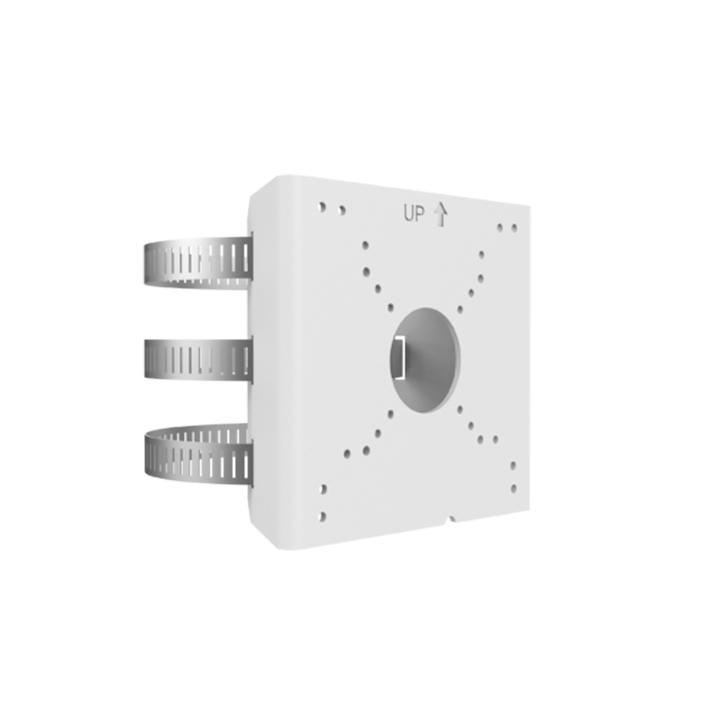
Optional installation accessory
$111.00 USD
Provides the pole interface for the supported Z332 assembly.
Qualified for the Z332 2.8mm arrangement on a 2.64–5-inch vertical pole. One PMAX-0538 plus one PMAX-0729 completes the mounting assembly; the pole mount alone is incomplete.
Choose it for a supported 2.64–5-inch vertical pole together with one separately sold PMAX-0729 junction box.
Already covered if: Skip it for direct surface mounting, poles outside the supported range, or an installation that already has the correct pole mount.
1-Year ClearVero™ Product Warranty
Available
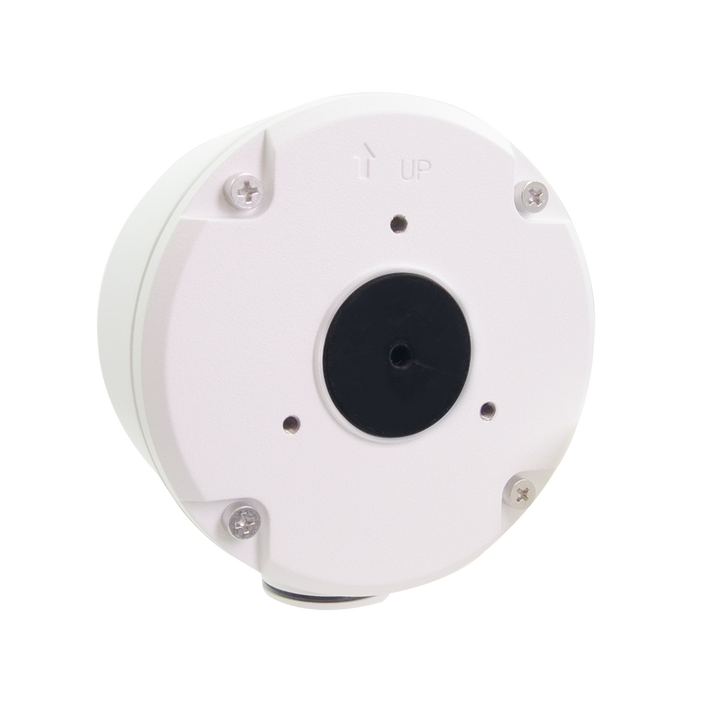
Optional installation accessory
$119.00 USD
Provides connection space at a compatible Z332 mounting point.
Qualified for the Z332 2.8mm arrangement. A pole assembly uses one PMAX-0729 and one PMAX-0538 per camera; the camera and pole mount are sold separately.
Choose it for junction space at a direct mounting point, or as the required companion box with PMAX-0538 for the supported pole assembly.
Already covered if: Skip it when a direct surface installation can use the integrated camera bracket and you can protect the connections without this box, or you already have the correct box.
1-Year ClearVero™ Product Warranty
Available
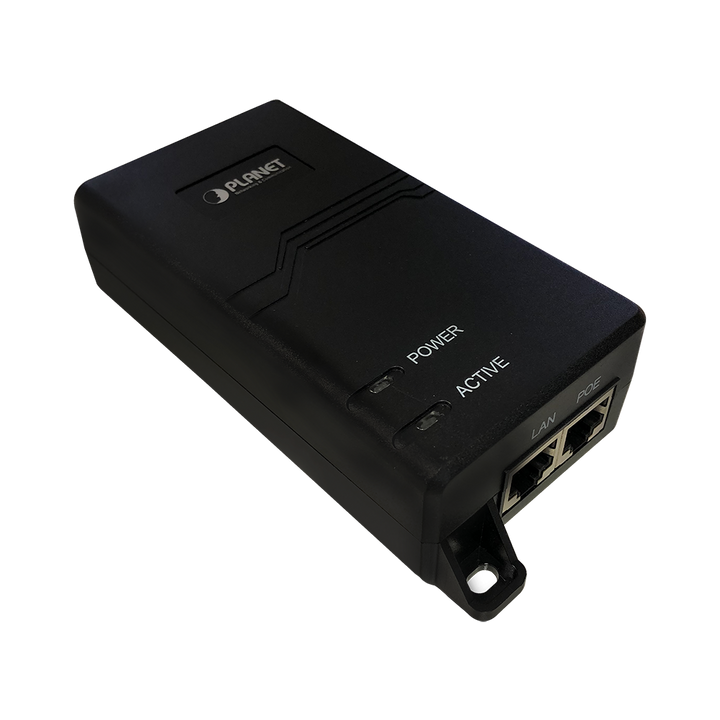
Optional installation accessory
$230.00 USD
Powers one camera and carries its data over the same Ethernet cable.
Up to 30 W with IEEE 802.3af/at. Use one injector per camera.
Choose it when your network switch has no available PoE port.
Already covered if: A compatible PoE switch with a free port already supplies power.
Available
PLAN YOUR OUTDOOR VIEW
Set your camera quantity above. Confirm the view, camera power and recording path, then select the optional equipment your installation needs.
SKU Z332